SSmith Bot Documentation
SSmith Bot is a powerful Discord bot designed for DayZ server management. Track kills, manage leaderboards, monitor server status, and much more.
Start with the Installation guide to get your bot up and running in minutes.
Features Overview
Killfeed
Real-time kill notifications with weapon info, distance, and location.
Leaderboard
Track player stats including kills, deaths, K/D ratio, and streaks.
Economy
Full economy system with payments, rewards, and casino games.
Bounties
Player bounty system with automatic tracking and rewards.
Account Linking
Link Discord accounts to in-game players for enhanced tracking.
Factions
Create and manage player factions with dedicated channels.
Support
Need help? Join our Discord support server for assistance:
Join Support ServerInstallation
Follow these steps to set up SSmith Bot for your DayZ server.
Step 1: Add the Bot to Discord
Click the button below to invite SSmith Bot to your Discord server:
Add to DiscordMake sure you have "Manage Server" permissions in the Discord server you're adding the bot to.
Step 2: Get Your DayZ Server ID
Your Server ID can be found in the URL of your Nitrado web interface:
- Go to webinterface.nitrado.net
- Select your DayZ server
- Look at the URL in your browser - the number after
/net/is your Server ID

The Server ID is the number in the URL (e.g., 11801594)
Step 3: Create a Long-Life Token
You need to create an API token on Nitrado that gives the bot access to your server:
- Navigate to server.nitrado.net
- Click "My Account" in the navigation
- Click "Developer Portal" under Options
- In the top right, click "Long-life tokens"
- Select all the permission options (
rootserverandservice) - Give the token a description (e.g., "SSmith Bot")
- Click Create
- Important: Copy and save the entire token - it may extend to a second line!
Never share your long-life token publicly. It gives access to your Nitrado server.
Step 4: Run the Setup Command
In your Discord server, run the setup command with your Server ID and token:
/setup-dayz
The bot will prompt you to enter your Server ID and Long-Life Token. If everything is correct, the bot will automatically create the necessary channels and start tracking your server.
Step 5: Configure Nitrado Game Server Settings
For the bot to work properly, you need to enable certain logging options in your Nitrado game server settings:
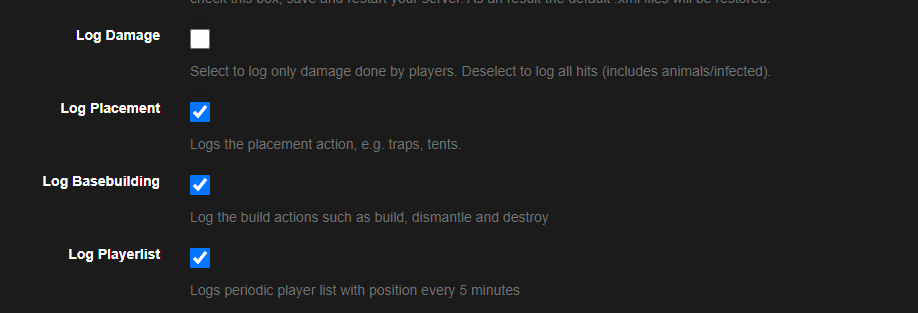
Required logging settings in Nitrado
| Setting | Status | Required For |
|---|---|---|
| Log Damage | Unchecked | Leave unchecked (reduces log noise) |
| Log Placement | Checked | Build feed, placement tracking |
| Log Basebuilding | Checked | Building, dismantling, flags (coming soon) |
| Log Playerlist | Checked | Heatmaps, player list tracking |
Once configured, the bot will start parsing your server logs and posting updates to your Discord channels.
Quick Start
Already completed installation? Here's a quick reference for common tasks.
Essential Commands
/setup-dayz
Initial setup for connecting your DayZ server
/stats
View player statistics
/leaderboard
Display server leaderboards
/link
Link your Discord to your gamertag
/balance
Check your economy balance
/user-search
Look up detailed player info
Channels Created
When you run /setup-dayz, the bot creates these channels automatically:
- 💀|killfeed - PvP death notifications
- 🧟|pve-feed - Non-PvP deaths
- 📊|leaderboards - Auto-updating leaderboards
- 🟢|connections - Player connect/disconnect feed
- 🧍|players-online - Current online players
- 🧾|server-details - Server status and info
- 🔗|link-gamertag - Account linking channel
- 🎯|bounty - Bounty updates
- 🛑|admin-alerts - Admin notifications
Killfeed
The killfeed feature posts real-time kill notifications to a designated Discord channel.
What's Included
- Killer & Victim Names - Shows both player names
- Weapon Used - The weapon that dealt the killing blow
- Distance - How far the shot was taken from
- Location - Map coordinates (can be toggled)
- Linked Accounts - Shows Discord mentions for linked players
Toggle Location Display
Hide or show kill locations:
/server-settings killfeed-location:false
Leaderboard
Track and display player statistics with automatic leaderboard updates every 8 hours.
Tracked Stats
- Total Kills
- Total Deaths
- PvP K/D Ratio
- Longest Kill Distance
- Highest Kill Streak
- Current Active Streak
- Longest Time Alive
- Structures Built
Commands
| Command | Options | Description | Permission |
|---|---|---|---|
/leaderboard [server] [stat] |
Display a specific stat leaderboard | Everyone | |
/stats |
(server) (gamertag/user) | Display stats for a player | Everyone |
/configure-leaderboard |
[server] [stat] [enabled] | Toggle specific stat leaderboards | Manage Server |
/refresh-leaderboards |
(server) | Manually refresh leaderboards | Manage Server |
/wipe-server-stats |
[server] | Wipe all stats for a server | Manage Server |
/wipe-player |
[server] [gamertag] | Wipe stats for a specific player | Ban Members |
Economy
Full economy system with balances, payments, and casino games.
Commands
| Command | Options | Description | Permission |
|---|---|---|---|
/balance |
(user) | Check balance for yourself or another user | Everyone |
/pay |
[user] [amount] | Send money to another player | Everyone |
/admin-pay |
[user] [amount] | Give money to a user or role (not subtracted from anyone) | Manage Roles |
/economy-wipe |
[toggle] | Wipe all economy data (toggle must be true) | Manage Server |
/coinflip |
[bet-amount] [side] | Gamble on a coin flip | Everyone |
/casino-blackjack [bet-amount] |
[bet-amount] | Play blackjack | Everyone |
DayZ Economy Settings
Configure automatic economy rewards tied to DayZ actions:
| Command | Options | Description | Permission |
|---|---|---|---|
/dayz-economy-settings |
Configure pay-on-kill, pay-on-ping, and death penalties | Manage Server | |
/dayz-economy-settings-view |
(server) | View current economy settings | Manage Server |
Account Linking
Link Discord accounts to in-game gamertags for personalized tracking and features.
Commands
| Command | Options | Description | Permission |
|---|---|---|---|
/link |
[gamertag] | Link your Discord to your gamertag | Everyone |
/unlink |
Unlink your gamertag | Everyone | |
/admin-link |
[gamertag] [user] | Link a user's Discord to a gamertag | Manage Roles |
/admin-unlink |
[user] [server] | Unlink a user from their gamertag | Manage Roles |
Seasonal & Historical Stats
PremiumPremium servers get access to both seasonal and all-time historical stat tracking.
Seasonal Stats
- Automatic stat wipes at the start of each season
- Fresh leaderboards for competitive play
- Season-specific achievements
- Configurable season duration
Historical Stats
- All-time stats that persist forever
- Legacy achievement tracking
- Compare seasonal vs all-time performance
- Historical leaderboards
Activity Heatmaps
PremiumVisual heatmaps showing player activity and PvP hotspots across your server map.
Features
- Player Activity Heatmap - Shows where players spend time
- PvP Heatmap - Shows where kills happen
- Auto-generated map images
- Configurable to separate channels
Heatmaps require "Log Playerlist" to be enabled in your Nitrado settings.
Faction System
PremiumCreate and manage player factions with dedicated channels, roles, and faction banks.
Features
- Auto-created faction channels and roles
- Faction banks with deposit/withdraw
- Faction stats and leaderboards (seasonal & historical)
- Alliance system between factions
- Leader and War-General management roles
Commands
| Command | Options | Description | Permission |
|---|---|---|---|
/faction-create |
[name] [leader] [unique] | Create a new faction | Manage Roles |
/faction-delete |
[server] [faction] | Delete a faction | Manage Roles |
/faction-stats |
[server] [faction] | View faction stats | Everyone |
/list-factions |
[server] | List all factions | Everyone |
/faction-bank balance |
Check faction bank balance | Faction Member | |
/faction-bank deposit |
[amount] | Deposit into faction bank | Faction Member |
/faction-bank withdraw |
[amount] | Withdraw from faction bank | Faction Member |
/faction-member add |
[member] | Add member to faction | Leader/War-General |
/faction-member remove |
[member] | Remove member from faction | Leader/War-General |
DayZ Shop
PremiumPlayers purchase items through Discord that spawn in-game after server restart.
How It Works
- Players browse items in the shop channel
- Purchase items using economy balance
- Choose spawn location (saved location or last known position)
- Items spawn after next server restart
Commands
| Command | Options | Description | Permission |
|---|---|---|---|
/buy-item |
[item] [location] (qty) | Purchase an item from the shop | Everyone (Linked) |
/dayz-shop-admin add-item |
Add item to shop | Manage Channels | |
/dayz-shop-admin modify-item |
Modify existing item | Manage Channels | |
/dayz-shop-admin delete-item |
Remove item from shop | Manage Channels | |
/dayz-shop import |
Import shop from file | Manage Server | |
/dayz-shop export |
Export shop to file | Manage Server | |
/global-shop-locations add |
Add a global spawn location | Manage Channels |
Custom Zones
PremiumSet up custom zones with entry alerts, kill notifications, auto-bans, and hot-zone multipliers.
Zone Features
- Entry/exit notifications
- Kill alerts within zone
- Build alerts within zone
- Logout alerts within zone
- Auto-ban on any violation
- Hot-zone kill multipliers for economy
- Zone ignore lists
Commands
| Command | Options | Description | Permission |
|---|---|---|---|
/create-zone |
[name] [owner] [notify] [channel] [x] [z] [radius] | Create a new zone | Manage Roles |
/delete-zone |
[server] [zone-id] | Delete a zone | Manage Roles |
/zone-details update |
[server] [zone-id] | Update zone settings | Manage Roles |
Automatic Banning
PremiumComprehensive automatic ban system for boosting, zone violations, and custom rules.
Auto-Ban Triggers
- Fireplace/garden plot boosting
- Ban on kill (for special game modes)
- Ban on death (for special game modes)
- Not linking within time limit
- Zone violations
Commands
| Command | Options | Description | Permission |
|---|---|---|---|
/ban-ignore add |
[server] [gamertag] | Add player to ban ignore list | Manage Server |
/ban-ignore remove |
[server] [gamertag] | Remove from ignore list | Manage Server |
/ban-ignore view |
[server] | View ignore list | Manage Server |
/server-alerts |
[server] | Configure boosting alerts and auto-bans | Manage Server |
Advanced Feeds
PremiumAdditional tracking feeds for complete server visibility.
Available Feeds
- 🩸 Player Hits - Track damage events between players
- 🔨 Build Feed - Track building, dismantling, and structure placement
- 🌀 Teleport Feed - Log admin teleports with locations
File Management
PremiumManage your server's JSON files directly through Discord.
Commands
| Command | Options | Description | Permission |
|---|---|---|---|
/remove-json |
[server] [filename] | Remove a JSON file from cfgameplay | Manage Server |
/timed-json |
[server] [interval] [duration] [filename] | Add a timed JSON file | Manage Server |